Tuesday, 31 May 2022

Android Boot Optimization using BootChart

 Hi Guys!!!

Hope you are doing well !. After long time I am back. Sorry for late to add new blogs. 

Today I am sharing details on Boot optimization using BootChart .  

First What is boot process. I have written one blog in 2017 with complete details on bootprocess. 

Android Boot Process 

Here is summary :-

The boot process is a chain of actions starting from the boot ROM, followed by the Bootloader, Kernel, Init, Zygote, and System Server (bold indicates Android-specific boot process).

 In the automotive-specific boot process, early services such as rearview camera must start during the Kernel boot.


Now coming to the point. Below are the few avilable point to do optimization .
  • Bootloader
  • Device kernel
  • I/O tuning
  • init.*.rc
  • Boot animation
  • SELinux policy
Tool and methods
Today I am discussing BootChart. 
Bootchart provides CPU and I/O load breakdown of all processes for the whole system.
To enable bootchart:

1. In Current User-debug Build 
To enable bootchart in current flashed user-debug build
adb shell 'touch /data/bootchart/enabled'
adb reboot
After boot up, fetch boot chart:
$ANDROID_BUILD_TOP/system/core/init/grab-bootchart.sh
When finished, delete /data/bootchart/enabled to prevent collecting the data every time.

2. Enable at compile time
$ Android_Build_Top_Dir/system/core/init 

In bootchar.h modification BootChart :
#ifndef BOOTCHART # define BOOTCHART 1 #endif

$ touch init.c
$ mm INIT_BOOTCHART=true
Triggering bootchart functionality on system boot
adb shell 'echo 120 > /data/bootchart-start' 
Retrieving the collected data from the system
system/core/init/grab-bootchart.sh
Analyzing the results
Use any image viewer to examine the graphic.Things to look for
  •  Start and top times of the various processes, and 
  • Their CPU utilization. 
Long gaps with low utilization may indicate a timeout or some other problem.
Once you have identified the processes that are using time during the initialization, you can further analyze these by looking at system logs, using strace, and examining the system source code.

Mostly usual suspects

1. In Kernel Init
  • ip_auto_config
  • USB init
  • Flash driver initialization 

2. In Zygote
Preloading Android Framework has thousands of Java classes Preloaded by Zygote and instantiated in its heap To improve Application startup time and save memory Controlled by resource
 frameworks/base/preloaded-classes
Zygote Class Preloading Can use the tool in framework to adjust the list: 
$ adb logcat > logcat.txt 
$ java -p preload.jar Compile logcat.txt logcat.compiled 
$ java -p preload.jar PrintCsv logcat.compiled 

3. In PackageManager
Package Scannig Every APK is scanned at boot time Package management code is inefficient Uses mmaped files means each access will cause page fault ParseZipArchive() scans entire APK for only one AndroidManifest.xml file

4. In System Services
Starting Last stage of Android boot Start every base service Zygote start SystemServer process Start native service (SurfaceFlinger, AudioFlinger) first Start each service sequentially

Thanks
Saurabh
Happy Coding!!!!

Friday, 30 July 2021

Bluetooth LE Audio

Hi Guys !!! Hope all is well

In my previous post  I have discussed BLE Advertisement and BLE scanning in Android.

Today I am going to shed some light on BLE Audio . Yes you read correctly  BLE Audio .

Bluetooth Special Interest Group (SIG) announced a new spin-off standard for audio, called LE (low-energy) Audio. The new framework allows two key features:

  • native support for hearing aids and 
  • audio sharing

bjjuhhk,j


Thursday, 29 April 2021

Ping an IP Address : Device is connected to the internet or not

Hi Guys !!! Hope all is well

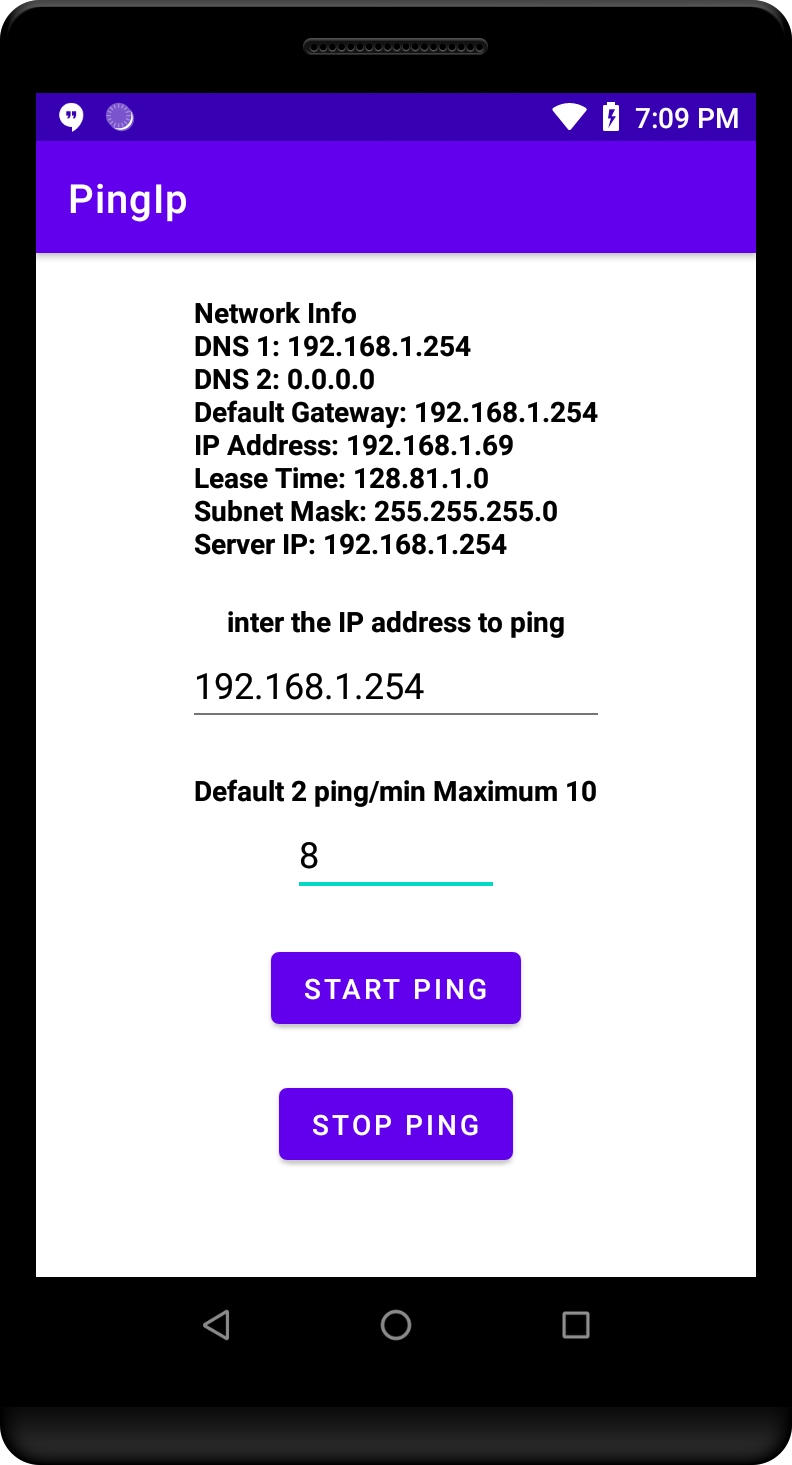
Today I am going to discuss about Ping in Android. Ping an IP Address used to determine if your device is connected to the internet. Below is the Ping Features : 

  • Ping is a network utility used to test reachable of an IP address or a host. 
  • It can measure the packet trip time which is called latency. 
  • Ping uses ICMP for request packets and waits for an ICMP response. 
  • Ping is useful to check a server's availability.
I am going to create one sample Android app to ping external IP address or AP Gateway IP Address. This application by default send 2 ping every minute. But it is configurable. You can increase or decrease ping rate either via UI or adb shell command.  You can download this app from my Github account.


Below is the code used in above app to ping given IP address
public boolean pingToServer(String host) {
//host = "192.168.1.65";
Runtime runtime = Runtime.getRuntime();
try {
Process ipProcess = runtime.exec("/system/bin/ping -c 1 " + host);
int exitValue = ipProcess.waitFor();
Log.d(LOG_TAG, "ping host: "+host+" exitValue: "+exitValue);
return (exitValue == 0);
} catch (IOException e) {
e.printStackTrace();
} catch (InterruptedException e) {
e.printStackTrace();
}
return false;
}
Above code used Android RunTime API to ping. It is very easy way to ping without going to much in details and no need to app get signed
public void startAlarm(int pingValue) {
final Handler h = new Handler();
Log.d(LOG_TAG, "MyPingService: PingCount : "+pingValue);
long startTime = System.currentTimeMillis();
int intervalTime = 30*1000;
if(pingValue<=10){
intervalTime = (60/pingValue)*1000;
}
final int delay = intervalTime; //milliseconds
Log.d(LOG_TAG, "MyPingService: Ping interval Time : "+delay);
h.postDelayed(new Runnable(){
public void run(){
//send Ping
if(IP_Address!=null){
if (pingToServer(IP_Address))
Log.d(LOG_TAG, "ping is reachable");
else
Log.d(LOG_TAG, "ping is not reachable");
}else {
if (pingToServer(getGatewayIP()))
Log.d(LOG_TAG, "ping is reachable");
else
Log.d(LOG_TAG, "ping is not reachable");
}
if (!stopHandler) {
h.postDelayed(this, delay);
}
}
}, intervalTime);
}
Above code set pinging on predefined value example :- 4 ping/minute. I am using Handler API  postDelayed  method to set repeating task.  
I have added Android Service to keep this app running in background . You can download my project and check all source code in details. 

Thanks
Saurabh 

Happy Coding !!! 

Build a Custom Kernel Module for Android

Hi Guys!!!Hope you are doing well !!!. Today I will describe how you can write a custom kernel module(Hello world) for Android and load it a...